What the Silent concurrency=80 Flag Actually Costs Your Business
Most teams discover container limits only after launching a campaign or connecting an AI agent to live e-commerce traffic. Because concurrency=80 is applied silently whenever a 2nd Gen function gets 1 vCPU, the system looks healthy in local tests and fails exactly when real customers arrive.
- Lost paid clicks during traffic peaks: When 20 to 80 shoppers open your AI shopping assistant during a Google Ads or social media push, a single OOM crash kills the container and drops every active chat session at once.
- Broken post-payment workflows: If payment webhooks (for example Stripe) wait on slow synchronous AI or email calls, bursts exceed your instance cap and return
429 Too Many Requestserrors, delaying order confirmations and support hand-offs. - Unpredictable cloud bills: Removing
max_instancesto "fix" crashes exposes your cloud budget and external LLM API quotas to bot spikes and retry storms.
Business Rule for Production AI
Default serverless settings are tuned for stateless JSON endpoints, not stateful AI agents. Controlling concurrency and adding a Pub/Sub buffer turns unpredictable OOM outages into a fixed, quantifiable capacity model.
Why concurrency=15 Serves 150 to 200 Live Users on One 1 GB Container
Lowering concurrency from 80 to 15 does not mean only 15 people can visit your site. You have to separate active chat sessions on screen from in-flight server turns:
- A concurrency slot is not occupied while a customer reads the answer or types a follow-up question. Idle readers consume 0 slots.
- A slot is held only for the 3 to 5 seconds of active LLM inference after the customer clicks Send. Once the response returns, the slot is released immediately.
- In real e-commerce traffic, 15 simultaneous in-flight turns within the same 4-second window correspond to roughly 150 to 200 active shoppers chatting at the same time.
- Paired with
max_instances=3, the backend safely absorbs 45 simultaneous active LLM requests per second while staying well below the 1 GB RAM ceiling.
| Configuration | RAM | Concurrency | Transport | Production Result |
|---|---|---|---|---|
| Default 2nd Gen SDK | 512 MB - 1 GB | 80 (silent) |
Direct HTTP | OOM crash under spike, dropped sessions, forced cold starts |
| Path A: Live AI Chat | 1 GB | 15 |
Direct HTTP | 150-200 live users per warm container, zero cold-start lag |
| Path B: Background Agent | 512 MB | 5 |
Eventarc + Pub/Sub | Buffers 1,000+ burst events, zero 429s, auto-retry on 500 |
Splitting Workloads: Direct HTTP vs. Cloud Pub/Sub Buffering
Not every AI task should hit a container synchronously. I split production backends in europe-west3 into two paths based on user intent and urgency:
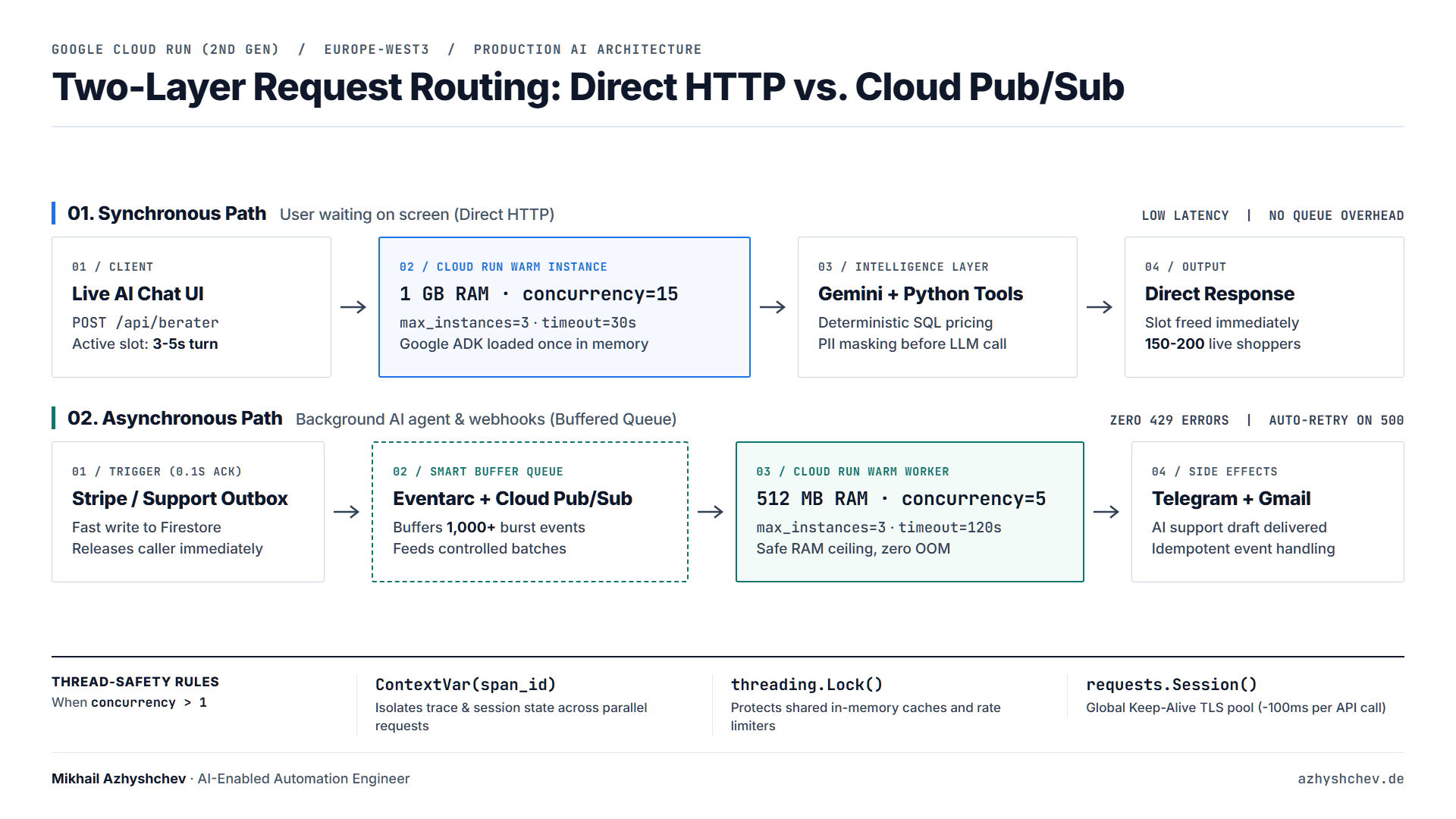
Path A: Synchronous Live Chat (1 GB RAM, concurrency=15)
When the customer is waiting on the screen (for instance, asking a RAG e-commerce assistant about product size or parcel status), the request goes via Direct HTTP to a warm container with google-adk already loaded in memory.
Path B: Asynchronous Background Agent (512 MB RAM, Pub/Sub + concurrency=5)
When the task happens in the background (sending order emails after Stripe payment or drafting a Telegram reply for a human operator), the webhook writes to Firestore in 0.1 seconds and releases the caller. Eventarc and Cloud Pub/Sub buffer up to 1,000+ burst events and feed them into the 512 MB worker in controlled batches of 5.
from firebase_functions import https_fn, firestore_fn, options

# Path A: Synchronous Live AI Chat (1 GB RAM, 15 concurrent turns)
@https_fn.on_request(
    region="europe-west3",
    memory=options.MemoryOption.GB_1,
    concurrency=15,
    max_instances=3,
    timeout_sec=30,
)
def berater_api(req: https_fn.Request) -> https_fn.Response:
    return handle_live_chat(req)


# Path B: Background AI Support Agent behind Pub/Sub + Eventarc (512 MB RAM)
@firestore_fn.on_document_created(
    document="telegram_support_outbox/{docId}",
    region="europe-west3",
    memory=options.MemoryOption.MB_512,
    concurrency=5,
    max_instances=3,
    timeout_sec=120,
)
def deliver_support_outbox(event: firestore_fn.Event) -> None:
process_support_draft(event)Thread-Safety Inside Warm Containers When concurrency > 1
Increasing concurrency above 1 introduces one strict requirement: Cloud Run does not isolate memory between parallel requests inside the same container. Storing a customer's trace_id or span_id in a plain global variable causes concurrent sessions to overwrite each other's data.
import contextvars
import threading
import requests

# 1. Isolate per-request telemetry (trace_id, span_id) across parallel threads
_log_context: contextvars.ContextVar[dict] = contextvars.ContextVar(
    "_log_context", default={}
)

# 2. Protect shared in-memory token caches or rate limiters with a lock
_cache_lock = threading.Lock()
_token_cache = {}

# 3. Reuse a global HTTP session pool (saves 50-150ms per TLS handshake)
_http_session = requests.Session()
Combining ContextVar isolation with a global Keep-Alive requests.Session() keeps data consistency intact while cutting 50 to 150 ms of TLS overhead from every external API call.
Frequently Asked Questions
Let's review your architecture, concurrency limits, and GDPR guardrails in a 30-minute technical call so your system stays fast and predictable under load.